Viking DeskTop Pet
Viking DeskTop Pet
 |
Odin 1.0 |
 |
Ragna 1.0 |
 |
COMIN SOON |
 |
COMIN SOON |
This desktop pet program, which runs on Windows, is a small application developed by viking-spirit.net. We hope it brings a little fun to your life! Feel free to download and use it!
1. Overview
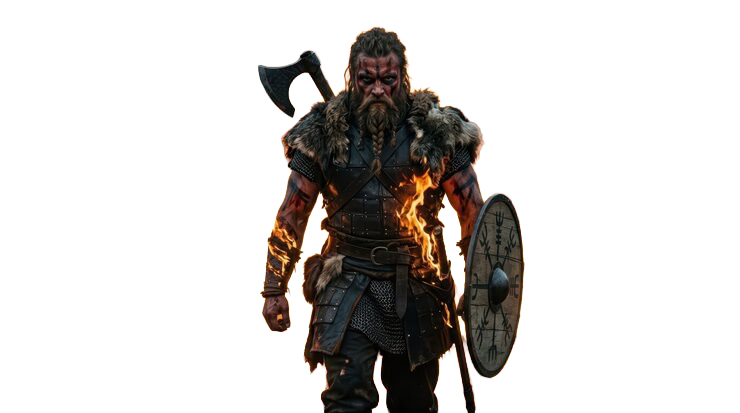
Ragnar is a desktop pet application built for Windows. No installation required — just double-click the EXE and he appears. Based on your provided artwork, Ragnar brings a realistic Viking warrior to your desktop: he keeps the original character's authentic facial features, hairstyle and metal/fur armor — deliberately non-cartoon, as if a legendary Norse warrior now keeps you company at your computer.
Positioning: a playful "desktop companion" fused with authentic Viking branding — a stress-relief tool and a living brand extension for VIKING SPIRIT.
2. Character Design
| Aspect | Detail |
|---|---|
| Source | Your Viking warrior artwork; live rendering preserves face, beard, hair and armor |
| Style | Realistic, retaining the original material textures (metal, leather, fur) |
| Background | True alpha semantic cutout — fully transparent; white garments are edge-restored and never mistakenly cut transparent |
| Window | Frameless, always-on-top, click-through outside the character |
3. Core Features
1) Free Drag Hold the left mouse button to drag Ragnar anywhere. While dragging he switches to a running pose that automatically follows your movement direction, then settles back to idle.
2) Click Interactions (Rotating) Each click cycles through four actions:
- 🏃 Run — in-place running
- 🦘 Jump — leap with landing bounce
- 💥 Squish — squash and rebound
- 🎢 Shake — rapid left-right wobble
Every click also shows a short, fun English speech bubble (e.g. "Watch this!", "For Valhalla!"), positioned above the character so it never covers him.
3) Right-Click Menu (17 items, all functional)
| Menu Item | Action |
|---|---|
| 💬 Chat with Me | Random chat lines + feedback |
| 🤚 Pet My Head | Petting animation |
| 🍖 Feed Me | Feeding animation |
| 🚶 Make Her Walk | Fully humanized walking loop (6 frames, no stiff movements) |
| 🕊️ Make Her Fly | Flying animation |
| 😴 Make Her Sleep | Sleeping animation with breathing |
| 🖱️ Follow Mouse | Follow the cursor around the screen |
| 📏 Adjust Size | Resize up to 300%, remains sharp |
| 📌 Always on Top | Pin/unpin toggle |
| 🌐 Visit viking-spirit.net | Open the official website |
| ⚙️ Start with Windows | Optional auto-start at boot |
| 🚪 Exit | Quit the program |
4) Multilingual Support
All UI, menus and lines support one-click switching between 5 European languages: English, Deutsch, Svenska, Norsk, Suomi. The choice applies instantly and is remembered for the next launch.
5) Viking Visual System
Every icon follows Norse culture: axe 🪓, shield 🛡️, raven 🐦⬛, dragon head, Mjölnir ⚡, longship ⛵. Menus, tray and panels use character-themed copy. The program logo, EXE icon and tray icon all use your VIKING SPIRIT badge (image 2).
6) Companion Dashboard A Viking-styled control panel shows the character's name, affection progress and interaction stats, with settings for language, reminders and more.
4. Technical Specifications
| Item | Detail |
|---|---|
| Platform | Windows x64 (Win10/11) |
| Launch | Double-click EXE, no install |
| Window | Transparent, frameless, no system title bar |
| Always on Top | Toggleable |
| Size Range | ~130px → 660px (300%) |
| Tray | System tray resident, hide-on-minimize |
| Auto-start | Optional |
| Quality | Passed 83 automated checks, 19 unit tests, E2E and multi-round stress tests |
5. How to Use
- Keep the whole
*,rarfolder together (the EXE depends on files in the same directory); - Double-click
Ragnar.exeto launch (if SmartScreen appears, click "More info → Run anyway"); - Drag with left button, click for interactions, right-click for the full menu;
- Enable "Start with Windows" in the right-click menu if desired.